DOCS
  • PowerSchool
  • Manuals
  • Teachers
  • Log In
  • PowerSchool
  • Manuals
  • Teachers
  • Log In
  • Home
  • FAQs
  • How Do I Remove a Widget?

How Do I Remove a Widget?

Published on February 12, 2016
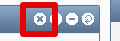
  1. Move your cursor over the symbol of an arrow in a circular shape. 
  2. More buttons will appear to the left of the arrow.
  3. Click the “X” button and the widget will be removed from your homepage.

Previous

If I Don’t See the Pop-up Message, How Do I Add a Widget?

Next

How Do I Rearrange Widgets on My Homepage?
  • How Do I Remove a Widget?
  • How Do I Rearrange Widgets on My Homepage?
  • Why Do I See a Message About Widgets Everytime I Log In?
  • What is a Widget?
  • Custom Reports
  • Printing off an Account List
  • Viewing Information on All Your Accounts
  • Viewing Information on A Specific Account
  • Setting Sources
  • Setting Field Selection
  • Setting Account Ranges
  • Setting Breaks
DOCS

All rights reserved

Searching in

Enter search term to find items
to navigate, to select, and to close
Login