The Sources setting controls type of information included. This can only be used in Detail reports; not Summary reports.
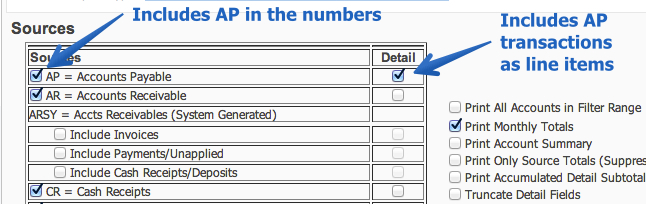
- The first thing on the Sources tab is a table with different sources of financial activity such as Accounts Payble, Accounts Receivable, Payroll, etc. Check the box on the left of each source to include batch level numbers for the source on your report.
- Check the box on the right of each source to include that soure in the detail.
- Check the box for Print All Accounts in Filter Range to see all accounts. Otherwise, only accounts with activity during the specified range will print on the report.
- A Detail report can be run across multiple months. Check the box for Print Monthly Totals, for monthly totals to print for each account.
- The Print Account Summary box may be checked to include the following details after each account.
- Budget
- Amount Spent
- Amount Left
- Percent Left
- Amount Encumbered
- Amount Left Unencumbered
- Check Print Only Source Totals to suppress all the detail lines on the report.
- The Print Accumulated Detail Subtotals prints subtotals at each Break specificied on the Breaks tab.
- Check one of the boxes under Purchase Order Parameters in order to print open Purchase Orders details on the report.
- The Include Budget Requisitions option can be ignored for Glenbard.
Examples:  print monthly totals.pdf